On this page
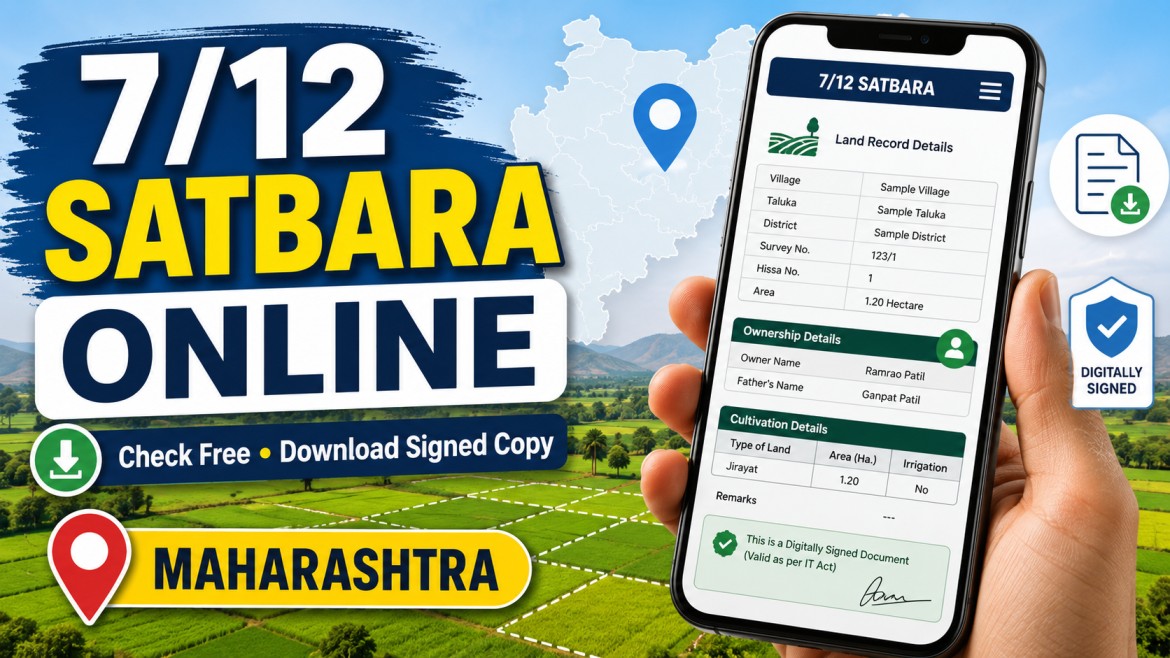
The 7/12 land record, commonly known as the Satbara Utara, is an important rural land record maintained by the Maharashtra Revenue Department.
It contains information connected with agricultural land, including the recorded holder’s name, survey or group number, land area, cultivation details, crop entries, rights, liabilities, and other revenue-record information.
Maharashtra residents can view an ordinary 7/12 extract online through the official Mahabhulekh portal. A separate Digital Satbara portal is available for downloading digitally signed 7/12, 8A, and Property Card documents.
Important: Nuvelloza.com is an independent informational website. We are not connected with the Maharashtra Revenue Department, Mahabhumi, Mahabhulekh, or any land-record authority. Always use the official government portals.
Maharashtra 7/12 Record Overview
| Particular | Details |
|---|---|
| Document name | 7/12 Extract |
| Common Marathi name | Satbara Utara |
| State | Maharashtra |
| Responsible department | Maharashtra Revenue Department |
| Free online viewing | Available through Mahabhulekh |
| Digitally signed copy | Available through Digital Satbara |
| Search details | District, taluka, village, survey number, group number, or name |
| Main use | Land-record information and official verification |
| Application mode | Online |
| Device | Mobile phone, tablet, or computer |
What Is a 7/12 Extract?
The 7/12 extract is a Record of Rights document associated mainly with rural and agricultural land in Maharashtra.
The name comes from two village forms:
- Form 7, which contains rights and holder-related entries
- Form 12, which contains crop and cultivation-related information
The document may display information such as:
- Recorded landholder’s name
- Survey number or group number
- Total area
- Cultivation details
- Crop information
- Type of land
- Rights and liabilities
- Mutation references
- Irrigation or related entries
- Other revenue-record details
The exact information displayed depends on the available official land record.
Is the 7/12 Extract Proof of Ownership?
The 7/12 extract is an important revenue record, but users should not treat it as the only or final proof of legal ownership.
For a property purchase, sale, loan, inheritance, or legal dispute, it may also be necessary to verify:
- Registered sale deed
- Mutation entries
- Title history
- Encumbrances
- Property map
- Court orders
- Inheritance documents
- Other records maintained by the registration and revenue authorities
Before purchasing land, obtain professional legal verification rather than relying only on the name appearing in the 7/12 extract.
Free View vs Digitally Signed 7/12
There are two important services.
Ordinary Online 7/12 View
The Mahabhulekh portal allows users to search and view available land-record information online.
This version is useful for:
- Checking basic land details
- Confirming names and survey numbers
- Reviewing the available online record
- Personal reference
The portal also advises users to apply for correction through the e-Hakk system if the online information differs from the handwritten record.
Digitally Signed 7/12
The official Digital Satbara portal provides digitally signed:
- 7/12 extracts
- 8A extracts
- Property Cards
- Other supported land records
The Maharashtra Revenue Department states that digitally signed 7/12, 8A, and Property Card documents may be used for official and legal purposes.
Users may need to register, sign in, add the required balance or complete an online payment before downloading an eligible digitally signed document.
How to Check 7/12 Online Free
Follow these general steps.
Step 1: Open the Official Mahabhulekh Portal
Open the official Maharashtra Mahabhulekh website on your mobile phone or computer.
Make sure the website belongs to the Maharashtra Government’s Mahabhumi system.
Avoid entering personal information on websites that merely copy the government portal’s design.
Step 2: Select the Correct Revenue Division
Choose the division applicable to the land.
The available selection may include regions such as:
- Pune
- Konkan
- Nashik
- Chhatrapati Sambhajinagar
- Amravati
- Nagpur
The portal layout may change, so follow the options currently displayed.
Step 3: Select 7/12
Choose the 7/12 record option.
Other available services may include:
- 8A
- Property Card
- Mutation information
- Other land-record services
Step 4: Select District, Taluka, and Village
Choose:
- District
- Taluka
- Village
Enter these details carefully because selecting the wrong village will display unrelated records.
Step 5: Choose a Search Method
Depending on the available portal options, users may be able to search using:
- Survey number
- Group number
- First name
- Middle name
- Surname
- Full name
Searching by survey or group number is often more precise than searching by name.
Names may be recorded in Marathi or may have spelling differences, so try another available search option if the first search does not find the record.
Step 6: Select the Correct Record
Review the results and select the relevant landholder or land parcel.
Check details such as:
- Name
- Village
- Survey or group number
- Land area
Do not select a record only because the name looks similar.
Step 7: Enter Mobile Number and Captcha
Enter the details requested by the official portal, which may include:
- Mobile number
- Language preference
- Captcha code
The exact fields may change when the website is updated.
Step 8: View the 7/12 Extract
The available record should appear on the screen.
Review the details carefully.
Depending on the browser and portal features, you may be able to:
- Print the page
- Save it as a PDF
- Take a personal reference copy
- Note the survey and holder information
An ordinary saved or printed webpage should not be misrepresented as a digitally signed certified extract.
How to Download a Digitally Signed 7/12
For an official-use copy, use the Digital Satbara portal.
Step 1: Open Digital Satbara
Visit the official digitally signed Satbara service operated by the Maharashtra Revenue Department.
The portal identifies itself as the authorised facility for digitally signed Records of Rights in Maharashtra.
Step 2: Register or Log In
New users may need to provide information such as:
- First name
- Last name
- Mobile number
- Date of birth
- Email address
- Login credentials
The current registration page requests personal and contact details for creating an account.
Step 3: Complete the Required Payment Process
The digitally signed service may require users to add balance or make an online payment.
Check the current fee displayed on the official portal before proceeding.
Do not trust a third-party website claiming to provide an official signed extract free of charge.
Step 4: Select the Land Details
Choose the required:
- District
- Taluka
- Village
- Survey or group number
- Record type
Verify all information before requesting the document.
Step 5: Download the Digitally Signed PDF
After the record is generated, download the digitally signed PDF.
Keep the original PDF because its digital signature and verification information may be important.
How to Verify a Digitally Signed 7/12
The Digital Satbara portal provides a 7/12 verification service.
Users can enter the verification number shown on the digitally signed document to check its authenticity.
This can be useful for:
- Banks
- Buyers
- Government offices
- Legal professionals
- Property transactions
- Document verification
What Information Does Satbara Show?
A 7/12 extract may contain:
- Recorded holder or occupant names
- Survey or group number
- Subdivision details
- Land area
- Assessment details
- Cultivation information
- Crop entries
- Irrigation information
- Rights and encumbrance-related entries
- Mutation references
- Other official revenue information
Not every document will contain every type of entry.
Uses of a 7/12 Extract
Checking Land Records
Landholders can check whether their name and land details appear correctly in the official record.
Agricultural Loan Applications
Banks may request a current land record along with other documents when evaluating an agricultural or crop loan.
The bank decides which version and supporting documents it requires.
Land Transactions
A 7/12 extract may be reviewed during agricultural land transactions.
However, buyers should also verify registered ownership documents, mutation history, legal title, and any applicable restrictions.
Government Schemes
Some agricultural, compensation, subsidy, or welfare applications may request land-record details.
Applicants must follow the document requirements of the particular scheme.
Mutation and Inheritance
After a registered transaction, inheritance, partition, gift, or another legal change, mutation proceedings may be required to update revenue records.
The Maharashtra Mahabhumi portal provides e-Hakk services for online mutation-related applications.
What to Do If the Online Record Is Wrong
Errors may include:
- Incorrect name
- Spelling mistake
- Wrong land area
- Incorrect unit
- Missing holder
- Record not updated after mutation
- Difference between online and handwritten records
The Mahabhulekh portal advises users to submit an online correction request to the Talathi through the e-Hakk system when relevant discrepancies are found.
Applicants may need:
- Supporting ownership document
- Registered deed
- Mutation number
- Identity proof
- Inheritance documents
- Court order
- Other evidence relevant to the correction
Submitting a correction request does not guarantee immediate approval. The authority must verify it.
How to Check Mutation Status
The Digital Satbara system provides an online mutation-status facility.
Users may be able to review:
- Mutation application status
- Mutation number
- Objection deadline
- Related village details
The official page states that any objection must be submitted to the relevant village Talathi office before the displayed deadline.
Common Problems While Searching
Record Not Found
Possible reasons include:
- Wrong district or taluka
- Wrong village
- Incorrect name spelling
- Old or changed survey number
- Record not digitised
- Recent mutation not updated
- Searching an urban property in the rural 7/12 service
Try searching by survey or group number or contact the local Talathi office.
Name Does Not Match
The name may have:
- Marathi spelling
- Initials
- Old surname
- Previous owner’s name
- Typographical error
- Pending mutation
Do not assume fraud immediately. Verify the full record and mutation history.
Payment Successful but Document Not Available
Use the payment-status option offered on the official Digital Satbara portal.
Keep:
- Payment reference number
- Transaction receipt
- Login details
- Document-request details
Contact the official support channel when necessary.
Website Not Opening
Government portals may sometimes experience:
- Maintenance
- Heavy traffic
- Browser compatibility issues
- Temporary server problems
Try again later or use another browser.
Important Safety Tips
- Use only official Mahabhumi and Mahabhulekh portals.
- Never share an OTP with an unknown agent.
- Do not send money to a personal UPI account.
- Verify the district, taluka, village, and survey number.
- Do not rely only on a name-based search.
- Keep the original digitally signed PDF.
- Verify the document number when needed.
- Do not publish another person’s complete land record publicly.
- Consult a lawyer before purchasing property.
- Do not treat a plain screenshot as a certified document.
Frequently Asked Questions
Can I view Maharashtra 7/12 online free?
Yes. Available land-record information can be viewed through the official Mahabhulekh portal.
Is the digitally signed 7/12 free?
The digitally signed portal may require payment according to the current government fee structure. Check the official portal before downloading.
Can I use a normal online printout for legal work?
A plain online view is mainly useful for reference. For official or legal use, obtain the digitally signed version requested by the relevant authority.
Is a digitally signed 7/12 valid?
The Maharashtra Revenue Department states that digitally signed 7/12, 8A, and Property Card documents can be used for official and legal purposes.
Can I search using the owner’s name?
Yes, where the portal provides name-search options. Searching by survey or group number may be more accurate.
What is ULPIN?
ULPIN is a unique land-parcel identification number used in land-record systems. The Maharashtra portal also provides jurisdiction searches using ULPIN, survey numbers, and village details.
Can I use 7/12 as final ownership proof?
It is an important revenue record, but buyers should verify registered title documents and obtain legal due diligence before a transaction.
What should I do if details are incorrect?
Use the official e-Hakk correction or mutation process, or contact the relevant Talathi and revenue office.
Final Words
Maharashtra’s online land-record system allows farmers and landholders to check 7/12 information without repeatedly visiting an office.
Remember the difference:
- Use Mahabhulekh to view the available record online.
- Use Digital Satbara when a digitally signed official-use document is required.
Before using the extract for a loan, sale, registration, or legal matter, confirm the exact document requirements with the bank, government office, registrar, or legal professional.
Disclaimer
This article is provided only for general informational purposes.
Nuvelloza.com does not issue 7/12 extracts, certify land ownership, correct records, process mutations, or represent the Maharashtra Revenue Department.
Land-record portals, fees, procedures, field names, and government rules may change.
Users must verify all information through the official Mahabhumi, Mahabhulekh, Digital Satbara, Talathi, Tehsildar, Sub-Registrar, or other authorised government office.
For land purchases, disputes, succession, or title verification, consult a qualified legal professional.

nuvelloza
Nuvelloza’s editorial team is responsible for researching, reviewing, and maintaining this guide.
More articles by this authorRelated guides
Live Rain Tracker App: Download RainViewer on Android and iPhone
On this pageRainViewer App OverviewWhat Is RainViewer?Main Features of RainViewerLive Rain RadarShort-Term Rain ForecastRain and Weather AlertsLocal Weather ForecastsRainfall TotalsTropical Storm and Hurricane…
How to Apply for a Driving Licence Online in India: Learner’s Licence, Test and Download Process
On this pageDriving Licence Application OverviewWhat Is a Learner’s Licence?Eligibility by Vehicle TypeDocuments Commonly RequiredStep 1: Apply for a Learner’s Licence OnlineOpen the…
Voter List 2026: Check Your Name and Download the Electoral Roll Online
On this pageVoter List 2026 OverviewWhat Is a Voter List?Why Is the Electoral Roll Important?Confirms Voting EligibilityShows Polling DetailsHelps Detect ErrorsReduces Last-Minute ProblemsIs…