On this page
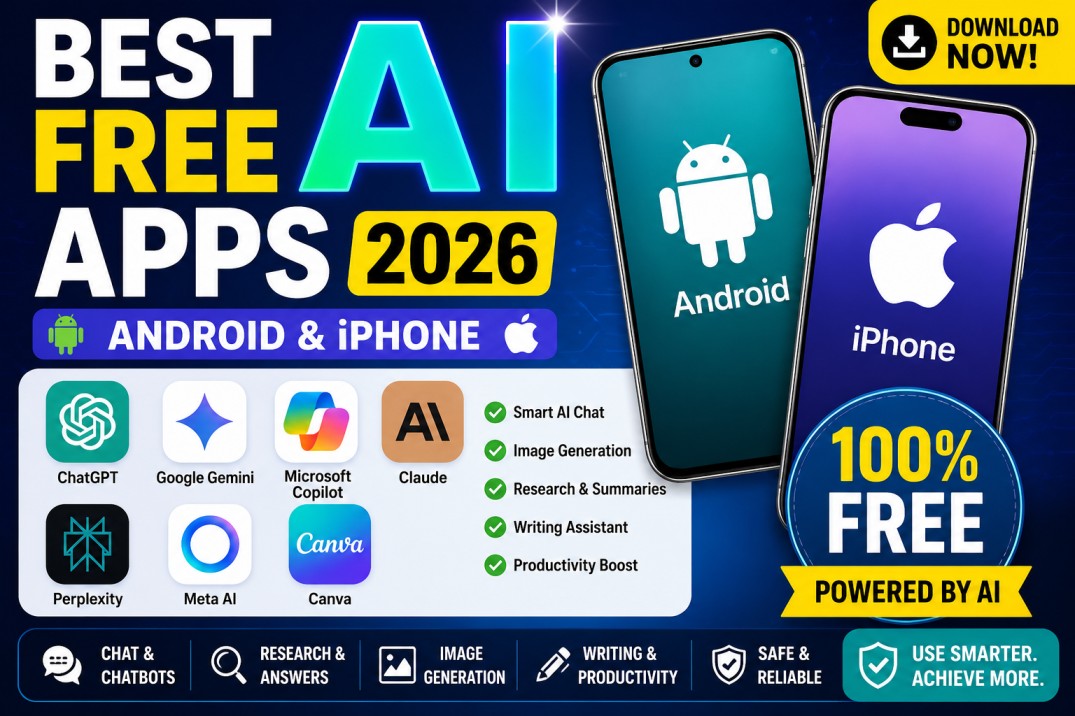
Artificial intelligence apps can help with writing, studying, research, image creation, planning, translation, coding, document analysis, and everyday questions.
Many leading AI applications are free to install on Android and iPhone. However, “free” usually means that the app includes usage limits, advertisements, restricted models, or optional paid subscriptions.
The best AI app depends on what you need. Some are better for general conversations, while others focus on web research, productivity, design, coding, or Google services.
This guide compares some of the best free AI apps available for Android and iPhone in 2026.
Important: Nuvelloza.com is an independent informational website. We are not affiliated with OpenAI, Google, Microsoft, Anthropic, Perplexity, Meta, Canva, Apple, or Google Play.
Best Free AI Apps: Quick Comparison
| App | Best for | Android | iPhone | Free plan |
|---|---|---|---|---|
| ChatGPT | General AI assistance | Yes | Yes | Yes, with limits |
| Google Gemini | Google users and Android integration | Yes | Yes | Yes, with limits |
| Microsoft Copilot | Everyday AI and Microsoft users | Yes | Yes | Yes |
| Claude | Writing, analysis, and coding | Yes | Yes | Yes, with limits |
| Perplexity | Research with sources | Yes | Yes | Yes |
| Meta AI | Casual questions and image creation | Availability varies | Availability varies | Yes |
| Canva | AI-powered design and content creation | Yes | Yes | Yes, some tools limited |
App features, free limits, availability, and subscriptions may change.
1. ChatGPT
Best for: General AI help, writing, brainstorming, coding, learning, files, and images
ChatGPT is an AI assistant developed by OpenAI.
It can help users with tasks such as:
- Answering questions
- Writing emails and articles
- Explaining difficult subjects
- Brainstorming ideas
- Summarising text
- Coding and debugging
- Planning trips or projects
- Analysing uploaded files or images
- Generating images
- Searching the web where available
OpenAI provides official ChatGPT apps for Android and iPhone. The free plan includes core ChatGPT access, although message, model, image, file, and tool limits can change.
Main advantages
- Useful for many different tasks
- Good conversational experience
- Supports follow-up questions
- Available on Android and iPhone
- Free users can access several tools
- Suitable for students, creators, workers, and developers
Possible limitations
- Free usage limits apply
- Some advanced capabilities require a paid plan
- AI answers may contain mistakes
- Features may vary by country and account
How to download safely
Search for ChatGPT in Google Play or Apple’s App Store and confirm that the publisher is OpenAI. OpenAI specifically advises users to verify the publisher to avoid fake apps.
2. Google Gemini
Best for: Google services, Android users, writing, planning, and multimodal questions
Gemini is Google’s AI assistant.
It can help with:
- Writing and rewriting
- Planning
- Learning
- Summarising
- Understanding images
- Brainstorming
- Voice conversations
- Google-related tasks
- Searching and organising information
Google provides Gemini apps for supported Android and iPhone devices. Availability depends on the device, language, account, and country.
Main advantages
- Works well with the Google ecosystem
- Useful on Android devices
- Supports text, voice, and images
- Suitable for planning and general questions
- Free access is available
- Can replace or extend assistant functions on supported Android devices
Possible limitations
- Some features require Google AI Pro or Ultra
- Usage limits apply
- Device and country availability differ
- Responses should still be checked for accuracy
Google’s official download page warns that internet access is required and users should verify important responses.
3. Microsoft Copilot
Best for: Microsoft users, general AI assistance, productivity, and image-related tasks
Microsoft Copilot is an AI assistant available through Microsoft’s mobile applications.
Depending on the app and account, it may help with:
- Answering questions
- Drafting text
- Summarising
- Planning
- Generating ideas
- Creating or editing content
- Working with Microsoft documents
- Productivity tasks
Microsoft provides free Copilot applications for Android and iPhone.
Main advantages
- Free mobile availability
- Useful for Microsoft account holders
- Good for general productivity
- Available across mobile and desktop platforms
- May connect with Microsoft 365 features
Possible limitations
- Microsoft offers different Copilot apps and plans
- Some work or Microsoft 365 features require a subscription
- Feature availability can depend on the account type
- Users should verify which official Microsoft app matches their needs
Before installing, confirm that the publisher is Microsoft Corporation.
4. Claude
Best for: Long-form writing, thoughtful explanations, document analysis, coding, and complex tasks
Claude is an AI assistant developed by Anthropic.
It is particularly useful for:
- Writing and editing
- Summarising long documents
- Research assistance
- Coding
- Analysing screenshots and files
- Planning projects
- Explaining complicated topics
- Improving reports and professional text
Anthropic provides official Claude apps for both Android and iPhone, and mobile apps are available to free-plan users. Some advanced features and higher limits require paid plans.
Main advantages
- Strong writing and editing assistance
- Useful for longer documents
- Good explanations
- Helpful for coding
- Supports files and images
- Free plan available
Possible limitations
- Free usage limits may be reached
- Some features are paid
- Availability may differ by region
- Important information should be verified
Search for Claude by Anthropic and confirm that the developer is Anthropic.
5. Perplexity
Best for: Web research, current information, and answers with cited sources
Perplexity is an AI-powered search and research assistant.
Unlike a traditional chatbot, it focuses heavily on finding information from the web and displaying sources with its answers.
It can be useful for:
- Researching current topics
- Comparing products or services
- Finding sources
- Summarising web information
- Asking follow-up questions
- Learning about news or technical topics
- Discovering references for an article
Perplexity offers mobile apps for Android and iPhone. Free users receive access to core search and chat features, while higher limits and advanced research features are paid.
Main advantages
- Displays sources
- Useful for current information
- Fast research experience
- Available on Android and iPhone
- Core search functions are free
- Helpful for students and writers
Possible limitations
- Sources can still be incorrect or misunderstood
- Free advanced-search usage may be limited
- Some file and research tools require Pro
- Users must open and evaluate the cited sources
Perplexity is often a better choice when source links are more important than creative writing.
6. Meta AI
Best for: Casual assistance, questions, and AI image creation
Meta AI is Meta’s artificial intelligence assistant.
Depending on location and availability, it may be accessible through:
- The Meta AI app or website
- Messenger
Meta describes its AI assistant as a tool for answering questions, completing everyday tasks, and creating AI-generated images for free.
Main advantages
- May be available inside apps people already use
- Suitable for casual questions
- Can assist with ideas and image generation
- Free access
- Convenient for Meta-platform users
Possible limitations
- Availability varies by country
- Not every feature is available in every Meta app
- Users should review privacy settings
- It may not be the strongest choice for deep research or complex documents
Do not download an unofficial APK claiming to be Meta AI. Use Meta’s official platforms or verified app-store listings.
7. Canva
Best for: AI-assisted graphic design, social posts, presentations, thumbnails, and visual content
Canva is primarily a design application, but it also includes several AI-powered tools.
Users can create:
- Social media graphics
- YouTube thumbnails
- Presentations
- Posters
- Resumes
- Videos
- Logos
- Image edits
- AI-written text
- AI-generated visual content
Canva offers free Android and iPhone apps. Its free plan includes many templates and tools, although several advanced AI and editing features require Canva Pro or have limited free usage.
Main advantages
- Beginner-friendly design tools
- Excellent for social media
- Useful for blog thumbnails
- Available on Android and iPhone
- Free templates and assets
- Includes AI-assisted design features
Possible limitations
- Many premium assets require payment
- Some AI tools have usage limits
- Background removal and advanced editing may require Pro
- Designs should be checked for commercial-use restrictions
For bloggers and social-media creators, Canva may be more useful than a general chatbot when the main task is creating visual content.
Which AI App Is Best?
The best choice depends on your purpose.
Best overall AI app
ChatGPT
It is suitable for writing, learning, coding, images, planning, and general questions.
Best for Google users
Google Gemini
It is especially convenient for Android and Google-service users.
Best for research
Perplexity
It is useful when you want current web information with visible sources.
Best for writing and documents
Claude
It performs well with longer text, reports, coding, and detailed analysis.
Best for Microsoft users
Microsoft Copilot
It is useful for people already working with Microsoft tools.
Best for social and casual use
Meta AI
It is convenient when available inside WhatsApp, Instagram, or other Meta apps.
Best for graphic design
Canva
It is ideal for thumbnails, posts, presentations, and visual content.
Best AI Apps for Students
Students may find these especially useful:
- ChatGPT for explanations and study planning
- Gemini for learning and Google integration
- Claude for document summaries
- Perplexity for research with sources
- Canva for presentations
Students should not submit AI-generated work as their own when that violates school or university rules.
AI should be used to:
- Understand topics
- Generate practice questions
- Improve grammar
- Create study plans
- Summarise personal notes
- Explore examples
Always verify important answers with textbooks, teachers, and official sources.
Best AI Apps for Content Creators
Content creators may use:
- ChatGPT for scripts and ideas
- Claude for long-form drafts
- Perplexity for research
- Canva for thumbnails and visual designs
- Gemini for brainstorming
- Copilot for productivity
AI-generated content should be reviewed carefully before publishing.
Avoid:
- Copying another article
- Publishing factual claims without verification
- Creating fake personal experiences
- Using copyrighted images without permission
- Mass-publishing repetitive AI content
Are These AI Apps Completely Free?
No app on this list should be described as offering every feature completely free and unlimited.
Most use a freemium model, which means:
- The app can be installed free
- Basic tools are available free
- Usage limits may apply
- Advanced models may require payment
- Some apps include in-app purchases
- Limits can change at any time
Always check the current app-store listing and subscription page before paying.
How to Download AI Apps Safely
Use Official App Stores
Install apps through:
- Google Play Store
- Apple App Store
- The developer’s official website
Check the Developer Name
Examples include:
- ChatGPT — OpenAI
- Gemini — Google
- Copilot — Microsoft Corporation
- Claude — Anthropic
- Perplexity — Perplexity AI
- Canva — Canva
- Meta AI — Meta
Avoid Unofficial APK Files
Unofficial APK websites may distribute:
- Fake apps
- Malware
- Modified subscriptions
- Data-stealing software
- Advertising fraud
- Outdated versions
Read Permissions
Check whether an app requests access to:
- Microphone
- Camera
- Photos
- Contacts
- Location
- Files
- Notifications
Only grant permissions required for the features you use.
Privacy Tips When Using AI Apps
Do not enter:
- Passwords
- Banking PINs
- Aadhaar OTPs
- Credit-card details
- Private medical records
- Confidential company information
- Personal identification documents
- Other people’s private information
AI services may store or process conversations according to their privacy settings and policies.
Review:
- Chat history settings
- Training or data-control options
- Memory settings
- Connected-app permissions
- Account security
- Data-deletion options
Limitations of AI Apps
AI applications can:
- Give incorrect answers
- Invent facts
- Misread images
- Use outdated information
- Misunderstand questions
- Produce biased or incomplete responses
- Generate inaccurate citations
For medical, financial, legal, election, safety, or government-service questions, always verify the answer through an official or qualified source.
Frequently Asked Questions
What is the best free AI app?
ChatGPT is a strong general-purpose choice, while Gemini, Claude, Perplexity, Copilot, Meta AI, and Canva are better for particular tasks.
Are AI apps free on both Android and iPhone?
The apps listed in this guide offer free access or a free tier on supported Android and iPhone devices. Availability and limits vary.
Which AI app is best for research?
Perplexity is useful for source-based web research. ChatGPT, Gemini, and Claude may also provide research features depending on availability and plan.
Which AI app is best for writing?
ChatGPT and Claude are both strong options for drafting, rewriting, summarising, and improving text.
Which app is best for AI images?
ChatGPT, Gemini, Meta AI, Microsoft Copilot, and Canva may offer AI image or design features, but free limits differ.
Can AI apps help with coding?
Yes. ChatGPT, Claude, Gemini, and Copilot can assist with coding, debugging, explanations, and examples.
Can I use more than one AI app?
Yes. Many users use different apps for different purposes, such as Perplexity for research, ChatGPT for writing, and Canva for design.
Are AI answers always correct?
No. Always verify important information.
Do AI apps need internet access?
Most mobile AI features require an active internet connection.
Are unofficial AI APKs safe?
They may not be. Install only from trusted official sources.
Final Recommendation
For most users, start with:
- ChatGPT for general tasks
- Perplexity for research
- Canva for design
Add:
- Gemini when you use Google services
- Copilot when you use Microsoft tools
- Claude for longer writing and detailed analysis
- Meta AI for casual assistance inside Meta platforms
You do not need to install every AI app. Choose one or two based on your actual needs.
Disclaimer
This article is provided for general informational purposes only.
Nuvelloza.com is not affiliated with or endorsed by OpenAI, Google, Microsoft, Anthropic, Perplexity, Meta, Canva, Google Play, or Apple.
App availability, features, supported devices, free limits, advertisements, pricing, subscriptions, privacy settings, and developer information may change.
Always verify the official developer name and current app-store information before installing or subscribing.

nuvelloza
Nuvelloza’s editorial team is responsible for researching, reviewing, and maintaining this guide.
More articles by this authorRelated guides
How to Check Whether an App Is Official Before Installing It
On this pageWhat Does “Official App” Mean?Why Should You Verify an App Before Installing It?15 Ways to Check Whether an App Is Official1.…
How to Cancel Hidden App Subscriptions on Android and iPhone
On this pageWhat Is a Hidden App Subscription?Why App Subscriptions Continue After UninstallingHow to Find Hidden SubscriptionsHow to Cancel an App Subscription on…

How to Identify Fake AI Apps: 15 Warning Signs Before Installing
On this pageWhat Is a Fake AI App?Why Can Fake AI Apps Be Dangerous?Personal information may be collectedLogin details may be stolenExpensive subscriptions…